![ETI-Logo-Flames-white-1.png]](https://help.eticed.com/hs-fs/hubfs/ETI-Logo-Flames-white-1.png?width=285&height=45&name=ETI-Logo-Flames-white-1.png)
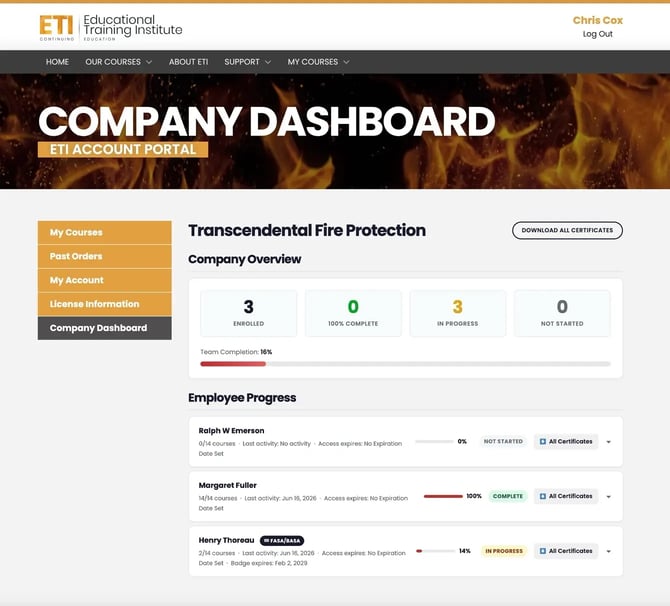
⚠️ Note: The Company Dashboard is only available to designated company managers. This feature must be enabled by the ETI team before it will appear in your account. If you'd like to have this set up for your organization, please contact us.
Accessing the Dashboard
Log in to your ETI account at eticed.com, then navigate to My Account → Company Dashboard using the left-hand sidebar. You can also access it directly at eticed.com/my-account/company-dashboard/.
Company Overview
At the top of the dashboard, you'll see a quick snapshot of your team's training status across four metrics:
- Enrolled — Total number of courses your team is enrolled in
- 100% Complete — Courses that have been fully completed
- In Progress — Courses actively being worked through
- Not Started — Courses that haven't been opened yet
Below the metrics, a Team Completion progress bar gives you an at-a-glance percentage of overall completion across your group.
Employee Progress
The Employee Progress section lists each team member individually. For each employee you can see:
- How many courses they've completed out of their total enrolled (e.g., 2/14 courses)
- Their last activity date
- Their access expiration date
- Their individual completion percentage and status badge (In Progress, Complete, etc.)
- A link to download their certificates
Downloading Certificates
Certificates can be downloaded in two ways:
- Individual certificates — Click the All Certificates button next to any employee to download their earned certificates.
- All certificates at once — Use the Download All Certificates button in the top right corner of the dashboard to pull certificates for your entire team in one action.
Got it. Here's a new section written to match the tone and style of the existing article:
Credentials on File
Each employee's accordion panel now includes a Credentials on File section where you can view and manage their professional licenses, permits, and national certifications directly from the dashboard.
Viewing credentials
Expand any employee's row to see their credentials on file. Only credentials that have been entered will be displayed. If none have been added yet, you'll see a message that reads "No credentials on file. Click Edit to add."
Adding or editing credentials
Click the Edit button in the Credentials on File section to open the edit view. From there:
- Select the employee's State Licensed In from the dropdown. This will display the credential types applicable to that state.
- Check the box next to any credential type the employee holds. A number field will appear — enter their license or permit number.
- National certifications (NICET, NAFED, ACE, ICC) are always shown below the state credentials and can be added regardless of state.
- Click Save when finished. The credentials will update immediately without requiring a page refresh.
Unchecking a credential type and saving will remove that credential from the employee's record.
⚠️ Note: Only the company manager can add or edit credentials. Employees cannot edit their own credentials from their account.
Employee Profile Photos
Employees can upload a profile photo from their My Profile page (My Account → My Account). Once uploaded, the photo appears as a small circular avatar next to their name in the Company Dashboard, making it easier to identify team members at a glance.
If no photo has been uploaded, the employee's initials will appear in place of the avatar.
Sidebar Navigation
The left sidebar gives quick access to other account sections:
| Menu Item | Description |
|---|---|
| My Courses | View your own enrolled courses |
| Past Orders | Review purchase history |
| My Account | Manage account details |
| License Information | View and manage seat licenses |
| Company Dashboard |
Return to this page
|